![con.png]](https://help.contractorcommerce.com/hs-fs/hubfs/con.png?height=50&name=con.png)
Open Settings and locate Integrations, then open the Chiirp integration configurations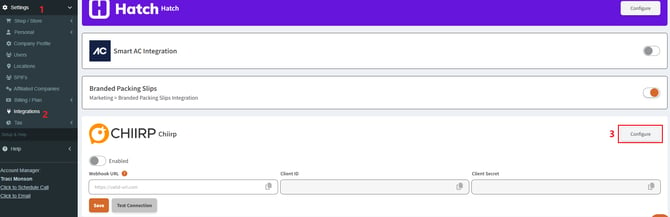
As you enable the integration, a client ID and client secret will be generated. Copy both of these values.
Go to Chiirp
In Chiirp, go to Integrations > Contractor Commerce > Connection.
Paste the Client ID and Secret into the appropriate fields.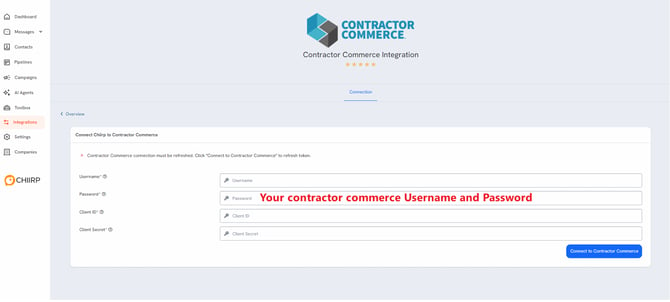
Once connected, Chiirp will generate a webhook address that needs to be pasted back into the Contractor Commerce integration page.
Be sure to add “https://app.chiirp.com” before the “/integrations” portion. 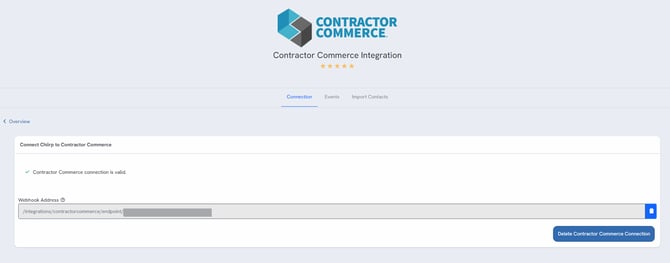
Once Webhook URL is pasted into the Contractor Commerce integration page, make sure to save and send a test connection. This connection will send a test contact from Contractor Commerce into your Chiirp; the success of this test connection validates the connection between the software and is ready to be configured within Chiirp!
From there, the contractor can select an EVENT from Contractor Commerce that triggers an action within Chiirp. These actions within Chiirp are the automations helping the 'speed to lead' that contractors are looking for, including drip campaigns, emails, text message, AI agent outreach, etc.
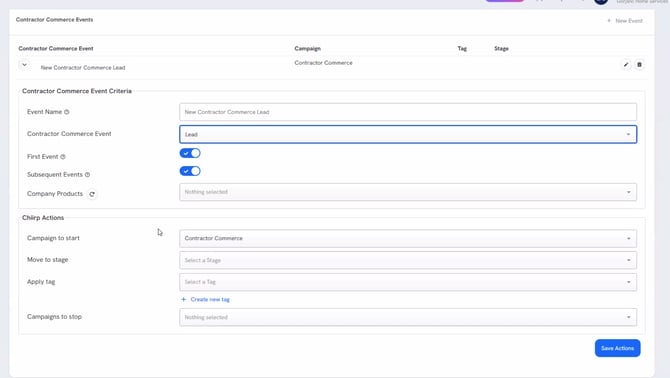
You can Set up multiple campaigns within Chiirp based on the action that happens within Contractor Commerce. For example, if you want a particular product to trigger a unique campaign (such as a membership purchase), you can select the SKU that needs to go down a different path within the integrations page in Chiirp.
Chiirp AI is coming and will integrate with these events soon. |